
.png)
.png)
Workday has been quicky evolving it's AI offerings over the past year. First, they acquired Flowise, then Sana. At DevCon this year, Workday's keynote put Claude, Gemini and ChatGPT right next to Sana on stage — which left a lot of people wondering the same thing: is Sana getting replaced already? Is Workday Extend still worth investing in? Should we just wait and see where this settles?
The short answer: none of it is going away. Workday is currently building out a layered system for AI agents, and Workday Extend Pro is where organizations build and control their own piece of it. Once you understand how the pieces fit together, the pace of change becomes less confusingand more useful.
In this post, we'll break down what's actually changing, how Sana, Extend and Workday's new governance tools fit together, and what Workday Extend Pro unlocks for organizations building in this new agentic era.
Sana, Extend and the Governance Underneath
Before getting into what's new, it helps to define a few terms Workday uses a lot right now, since a lot of the confusion comes from not knowing what each piece actually does.
- Sana: Workday's newly acquired AI platform, positioned as the “experience” layer. Sana is an enterprise AI platform that can work across your files, emails and meetings, not just your Workday data. Instead of navigating Workday's usual interface, organizations with Sana Enterprise (a separate, additional license) can interact with an agent that pulls from Workday data, files and meetings all in one place.
- Extend: Workday's build layer, and the platform organizations use to create their own custom apps, pages and integrations inside Workday. With Extend Pro specifically, that same platform now extends to building agents.
- Agent Gateway and Agent System of Record (ASOR): the governance layer sitting underneath both Sana and Extend. This controls which agents can access which data and keeps an audit trail of everything an agent does, whether it was built in Sana, Extend or somewhere else.
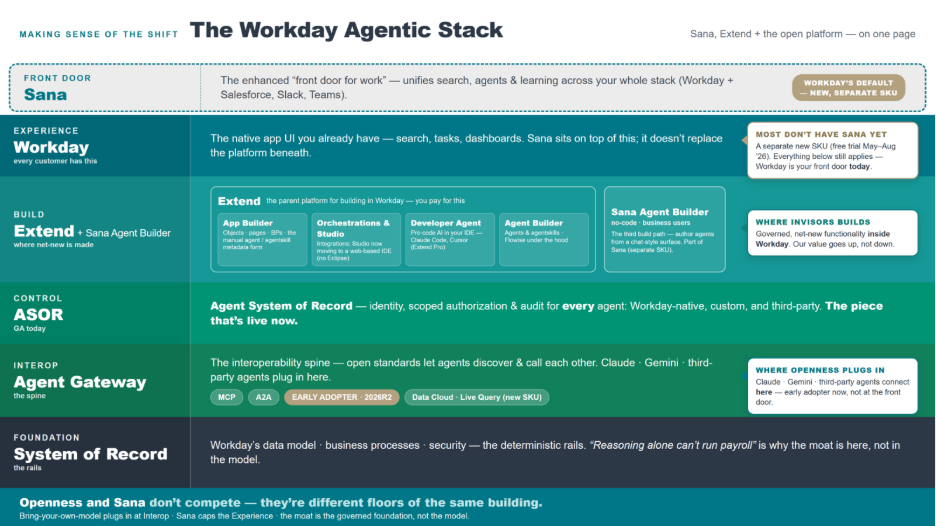
At DevCon, Workday's keynote highlighted openness, showing Claude, Gemini and ChatGPT alongside Sana. That led a lot of people to assume Sana and Extend must be on their way out. They're not. Openness just means that any agent, regardless of where it was built or which underlying AI model it uses, still has to run through that same governed layer underneath. Sana and Extend are still the core of how organizations build and experience AI in Workday, they're just no longer the only agents that can connect.
Sana, Extend and the governance layer are different floors of the same building, not competing buildings. Openness is the front door being unlocked to more visitors, not a sign the building itself is being torn down.
Building Agents in Workday
Once you know the layers, the next question is: how does an organization actually build an agent? There are three paths, depending on which platform an organization is working in:
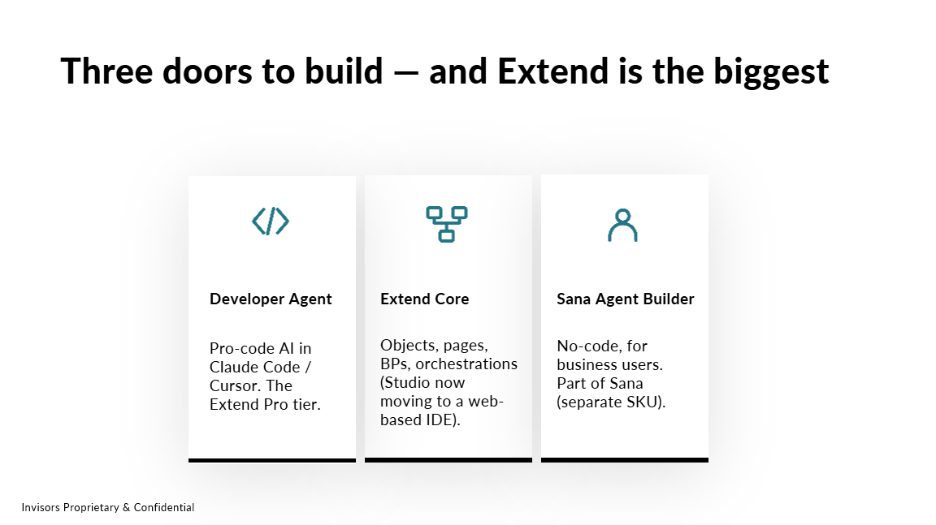
- Developer Agent: A plain-English prompt can generate an entire app end to end: the objects, the pages and even the security domains.
- Extend Core: Building an agent manually, using metadata and files, similar to how custom objects or pages are already built in Extend today, whether by an internal team or a partner like Invisors.
- Sana Agent Builder: Organizations describe what they want in plain language, and the tool builds it.
Workday Extend Pro is where all three will come together as the most versatile path. Organizations can use it to build agents, traditional custom apps and integrations they're already running in Workday.
That being said, an agent is only as good as the instructions it's given. Developer Agent will happily build exactly what it's told to, even if that means missing a field, skipping an approval step or building more than what's needed. An approval layer is necessary to define the real requirements and test what gets built, the same way someone would review any new app before rolling it out.
This is why governance matters, no matter which path is used to build. With Agent Gateway, organizations decide exactly what each agent can access. An agent can work with payroll data, for instance, without being given access to compensation data more broadly. Because of that, most agent tools also build in a human-in-the-loop step: before a change is made, a person sees what's about to happen and must approve it first. ASOR then keeps an audit trail of what the agent did, the same way Workday already tracks activity for an integration system user.
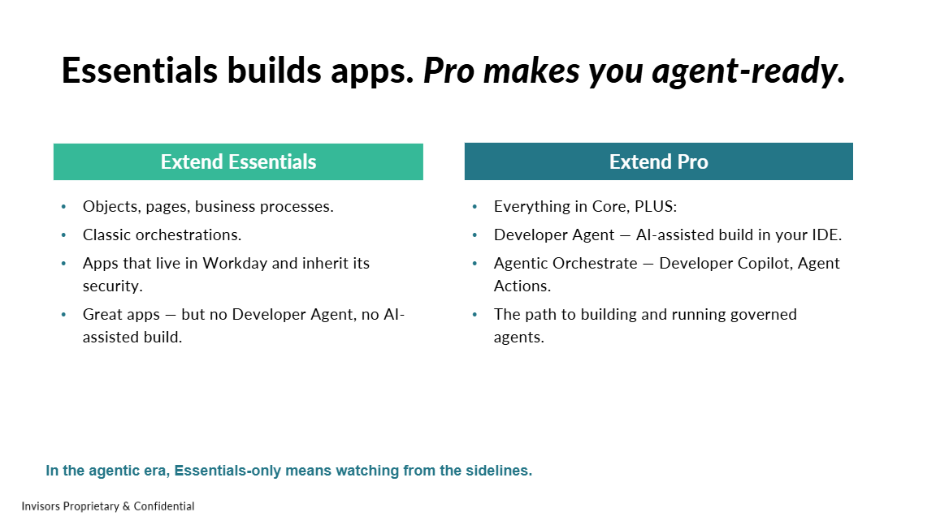 Extend Essentials or Extend Core both have the capability to build fully functional apps, business processes and orchestrations. What they don't include is Developer Agent or the ability to build and govern agents. In the agentic era, that's the real difference between the two tiers.
Getting Started
Here's where things stand today:
-
Live: Agent System of Record (GA), the BP Optimize agent (GA), the self-service agent and Developer Copilot for Orchestrate (GA with Extend Pro)
- Early adopter: Agent Gateway, Developer Agent, Agent Builder, Agent Ready Tools (aka MCP) (GA 2026R2)
- On the roadmap: Agent Passport and agent-to-agent handoff (beyond R2)
The recommendation: don't wait for GA. Start with the governed platform now, since Extend and ASOR are the foundation regardless of which agents an organization ends up using and keep that governance anchored in Workday even as the underlying AI model stays swappable.
None of this requires having every answer today. The pieces that matter most, a governed foundation and a clear picture of what's live versus what's coming, are already available to build on now.
Wondering if you are getting left behind in the agentic era? Want to see how Invisors is using Workday’s AI platform with our customers? Fill out the form to schedule time with our team, ask any questions you have and get a free demo of what you can unlock with Workday Extend Pro!