
.png)
.png)
Open Enrollment in Workday can be complex, especially with tight timelines and multiple moving parts across benefits, providers and employee events.
The key to a smooth process is preparation. From updating rates and pay periods to managing qualifying life events, small gaps can create major downstream issues.
This checklist outlines six key considerations to help you plan, execute and manage your Workday Open Enrollment cycle with confidence.
#1 | Pre-Open Enrollment: Rates, providers and plans
Before launching OE, verify that you have all the new providers and plans set up in Workday. It is very common to have new providers in your Open Enrollment cycle. Here are a few things that go hand-in-hand with new providers:- New Plans
- New Rates
- Benefit Plan Mapping
Have you ever been in a situation where you forgot to include new providers or new plans?
Missing a provider or plan after OE launch can require canceling and relaunching the event, creating unnecessary disruption.
If you have forgotten to include new providers before launching OE, you will need to:
1. Cancel the OE that has been launched
2. Make the necessary updates
3. Test and retest to confirm necessary updates have been made
4. Relaunch OE
5. Alternatively, you can set up a mini event to move everyone from the old plan to the new plan once OE is closed
#2 | Pre-Open Enrollment: Updates to pay period dates
One of the annual updates that is crucial to make is to update pay period schedules. Updating pay period schedules before OE is critical, as Workday uses this data to calculate per-pay-period deductions. This will show as $0 if you have not updated pay periods and will not recalculate once pay periods have been updated.
#3 | Pre-Open Enrollment: ACA measurement period updates
- Review the Affordable Care Reporting configuration
- Update your measurement period rules
- Create a new measurement period
- Review and update the passive events with new rules
- Determine if you need to load hours
- Run the passive event if not already scheduled
#4 | Review of Benefit Events Status Report
Have you ever had your Open Enrollment events go on hold?
Open Enrollment events can go on hold due to overlapping coverage types and effective dates, often referred to as “Coordination of Events.” The Benefits Events Status report can help you identify issues with dates, coverage types and more.
#5 | Coordination of events with new hires
There are a few different scenarios for new hires that could come up during Open Enrollment.
- Employee hire date = current date or in the past
1. Employee is still in the process of completing onboarding + new hire enrollment has not triggered:
- In this scenario, OE will trigger even when the new hire event has not triggered
- OE event will go on hold when a New Hire benefits event triggers as part of
onboarding
2. New Hire Enrollment event has triggered and is in progress:
- In this scenario, OE will trigger and will go on hold - Employee hire date = current date or in the past AND there is a 30-day waiting period
- The new hire enrollment event would have triggered and is in progress or is completed
- In this scenario, OE will not trigger if you check the box to exclude employees in the waiting
period - Employee hire date = future date
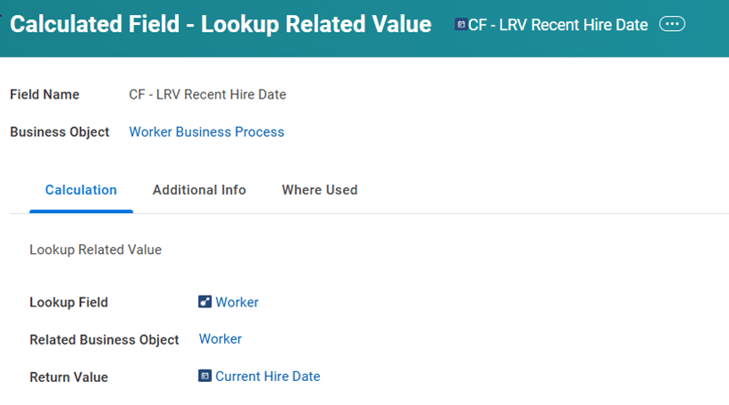
- In this scenario, OE will trigger based on the event date before the employee's start date if you
do not have a step delay for the hire date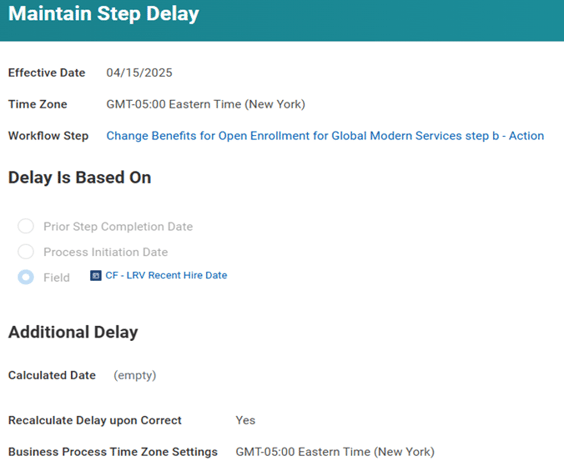
#6 | Coordination of Qualifying Life Events (QLE)
- Employees have a QLE after OE is completed (closed and finalized)
- If an employee initiates a Marriage event with a backdate prior to Open Enrollment + OE is already complete
- In this scenario, Workday relaunches OE - Employees have a QLE while OE is in progress
- If an employee initiates a Birth event while OE is in progress, but elections have been submitted
- In this scenario, a new OE task triggers and coverage defaults to what was elected in the QLE
As Open Enrollment approaches, taking the time to prepare now can make all the difference in ensuring a smooth, successful process for your organization. To stay organized and ahead of deadlines, download our OE Calendar + detailed checklist of tasks, a helpful tool to track important tasks and timelines.
A successful Workday Open Enrollment cycle depends on thoughtful planning, accurate configuration and proactive issue management.
If you’re preparing for OE or looking to optimize your current process, explore our Workday Support Services or connect with our team for guidance tailored to your organization.